Coaching Landing Page Builder
Describe your coaching offer. Looops generates a coaching landing page with packages, testimonials, FAQ and a booking form, on your own custom domain.
Free plan available, no card required
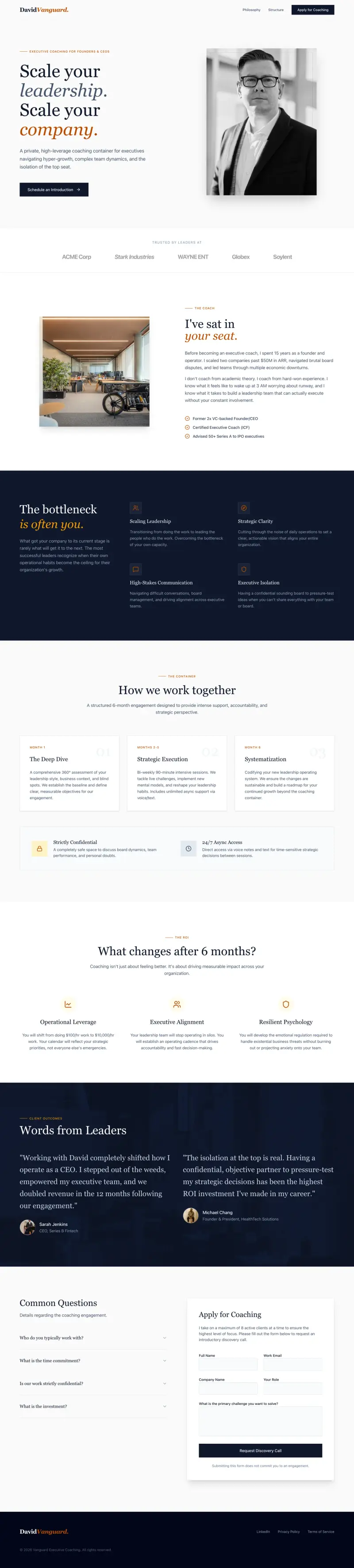
Built with Looops from a single prompt
View live demoHow Looops builds your landing page
Describe your coaching offer
Tell Looops what you coach on, who it's for, format and the outcome clients get.
AI builds the landing page
Looops generates a hero, what's included, testimonials, FAQ and a booking or application form, matched to your tone.
Add testimonials and packages
Drop in client testimonials, package details and pricing. Looops handles the layout.
Publish on your domain
Connect your domain. Bookings come to your email or wire to Calendly, Cal.com or your scheduling tool.
Everything you need, in action
Real product footage, exactly as it works. No mockups.
Chat to change anything
Just describe what you want in plain English. "Make the hero bigger." "Add a contact form." "Use warmer colors." No menus, no settings.
Click any element to edit it
Click the element selector (top of the chat), then click anything in the preview: a button, a paragraph, an image. The AI focuses on just that piece.
Publish in one click
When you're happy, hit Publish. Your site goes live on your own address in about a minute, with a custom domain on paid plans.
Undo any change
Every change becomes a checkpoint. Hover any message and click Undo to revert that step, or open Version History to jump further back. You're never stuck with a version you don't like.
Import a Figma design
Paste a Figma frame URL or drop a Figma file into the chat. Looops reads your layers and converts them into a real, editable page.
Show it a picture
Paste or drag any image into the chat: a sketch, a screenshot, an inspiration photo. Looops understands what it sees and builds toward it.
Feed it your documents
Drop in your menu, price list, or company PDF. Looops reads it and uses your real content instead of placeholder text.
It remembers you
Tell Looops once: 'I prefer bold colors' or 'never use stock photos of handshakes'. It saves your preferences and applies them in every future conversation.
Real photos, on demand
Ask for 'a warm photo of fresh bread' and Looops searches stock libraries or generates the perfect image, then places it for you.
Keep the ideas coming
No need to wait. Type your next request while Looops is still working and it queues up automatically.
Watch your credits live
See exactly what each task costs as it runs, and stop anytime. No surprises.
Errors fix themselves
If something ever breaks, a 'Fix the error' button appears. One click and Looops finds what broke and patches it.
How Looops compares
Honest, side-by-side. We acknowledge where competitors are stronger.
Framer
Looops vs Framer compared: code export and ownership, real backend vs CMS, AI building, design and pricing. See which AI website builder fits your project.
See full comparisonWix
Looops vs Wix compared: AI website generation, source-code export, real backend, pricing and ownership. See where each wins and which fits your project.
See full comparisonCarrd
Looops vs Carrd compared: AI building, multi-page sites, backend, code export and pricing. When the simple one-pager isn't enough, an honest breakdown.
See full comparisonBuild for free,
upgrade to unlock more.
No card to start. Upgrade only when you need more.
Free
Try the AI builder. No card required.
Personal
Your own website on your own domain.
Pro
Unlimited websites and team collaboration.
Frequently Asked
Questions.
Related solutions
More things you can build with Looops in minutes.
Build your landing page now
Free plan, no card required. Export anytime.
Free plan available, no card required