How to Build a Photography Portfolio Website
By Sam Codes · · 9 min read
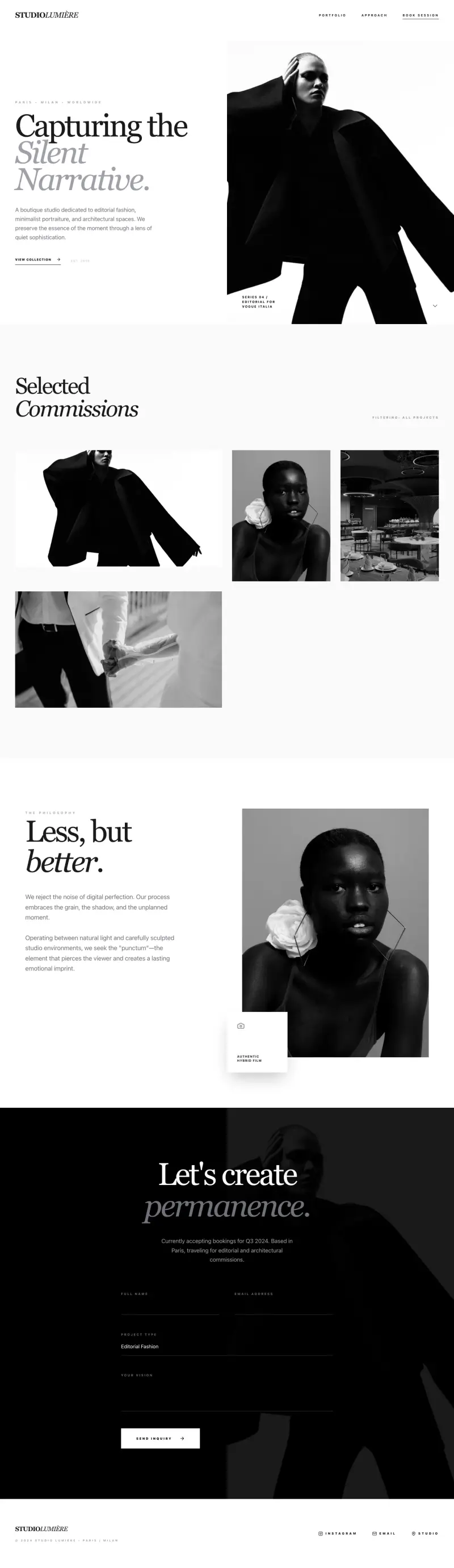
By the end of this guide, you will have a photography portfolio website that shows your best work, communicates what you offer, and gives potential clients a clear path to book you. You do not need a web designer or any coding knowledge.
Most photography websites fail to convert visitors into enquiries because they show too many photos, bury the pricing, or make it hard to get in touch. This guide walks through each step so your site works as a sales tool, not just a gallery.
What a photography portfolio website needs to do
Your website has one job: turn someone who found you online into a paying client. That means it needs to show your work clearly, explain what you do and who you do it for, give potential clients enough information to decide, and make it easy to reach you.
A portfolio that does all four things well will generate enquiries consistently. One that is just a gallery of photos might impress visitors, but it will not convert them.
- A curated gallery that shows your best work, not everything you have ever shot
- A clear explanation of the types of photography you offer
- Pricing or packages (even a starting-from price removes friction)
- An about page that builds personal trust
- A contact or booking page that makes it easy to reach you
- A way for Google to find you when people search for photographers in your area
Step 1: Pick your best work and edit it ruthlessly
The most common portfolio mistake is showing too many photos. Twenty exceptional images beat a hundred average ones. Clients form an impression in seconds, so every photo you include should earn its place.
Start by selecting your 30-40 strongest images. Then cut that to 15-25 for your main gallery. If you shoot multiple specialties (weddings, portraits, commercial), create a separate gallery for each so clients immediately find work that matches what they need.
- Show 15-25 images max in any single gallery
- Lead with the image that best represents what you want to be hired for
- If you shoot multiple types, organize by specialty (weddings, portraits, events)
- Remove anything that is not close to your best work, even if you were proud of it at the time
- Export at 2000px on the long edge and compress to under 300KB per image for fast loading
Step 2: Choose a gallery layout that serves your work
How your photos are displayed matters almost as much as which photos you show. A gallery layout should make the images easy to view without competing with itself for attention.
For photographers, a clean grid or masonry layout works well for most niches. For wedding and lifestyle photography, full-width images that load in sequence can feel more immersive. For commercial work, a minimal white-background grid keeps the focus on the subject.
Grid gallery
Clean rows and columns, consistent thumbnail sizes. Works well for portraits, products, and commercial photography. Easy to scan.
Masonry gallery
Variable heights in columns, like a Pinterest layout. Works well for travel, lifestyle, and event photography where cropping to a uniform size would hurt the composition.
Full-width slideshow or scroll
One image at a time, large and immersive. Best for wedding and editorial photographers who want an emotional first impression. Slower to browse but more impactful.
Step 3: Write an about page that builds trust
Clients hire photographers partly for their skill and partly because they feel comfortable with them. Your about page is where that comfort is established. A photo of yourself, a few sentences about your background and approach, and a line or two about what kind of work you love to do goes a long way.
Keep it personal but professional. This is not a resume; it is a first impression. End with a call to action: "Interested in working together? Get in touch."
- Include a good photo of yourself (not a selfie)
- Explain your background and what drew you to photography
- Describe the types of shoots you specialize in and where you are based
- Mention what the experience of working with you is like
- End with a link to your contact page
Step 4: Add pricing or packages
Many photographers hide their pricing, worried it will scare clients off. The research consistently shows the opposite: listing at least a starting price filters out poor-fit enquiries and gives serious clients the confidence to reach out.
You do not need to list every variation. A simple packages page with two or three tiers (for example, a half-day portrait session, a full-day wedding package, a commercial day rate) gives clients enough context to know if you are in their range.
- Show at least a "starting from" price to remove guesswork
- Offer two or three clear packages rather than a long list of variables
- Describe what is included (hours, edited photos delivered, prints, etc.)
- Add a short FAQ about payment, turnaround time, and what to expect
- Include a call to action on the pricing page: "Not sure which package fits? Let's chat."
Step 5: Make it easy to get in touch or book
Your contact page is where enquiries happen. Make it as low-friction as possible. A simple form with name, email, the type of shoot they are interested in, and their preferred date is enough to start a conversation.
Respond to every enquiry within 24 hours. Many photographers lose bookings not because of their website but because they are slow to reply.
- Keep the form short: name, email, shoot type, date, and a notes field
- Include your email address as plain text alongside the form (some people prefer to email directly)
- Mention your general location and whether you travel
- Set expectations: "I reply within 24 hours"
- Test the form yourself before publishing to make sure enquiries arrive in your inbox
Step 6: Get found when people search for a photographer
Most photography clients find photographers through Google or Instagram. Your website handles the Google side. The basics are not complicated.
Make sure each page has a descriptive title that includes your specialty and location (for example: "Wedding Photographer in Edinburgh | Jane Reid Photography"). Write a short description for your home page that explains who you are and where you work. Use real text captions or alt text on your gallery images since Google cannot read photos.
- Put your specialty and city in your home page title and description
- Add descriptive alt text to all your gallery images ("outdoor portrait session, Dublin")
- Create a separate page for each specialty (weddings, portraits, events) so each one can rank
- Mention your location naturally in your about page and contact page text
- Claim your Google Business Profile if you are based in a physical studio or serve a local area
How Looops makes building your portfolio easier
Looops is an AI website builder you drive by chatting. Describe your photography business, your specialty, and the feel you want, and it builds the full site for you, galleries, about page, pricing, and contact form. You then refine it by talking to it: "change the gallery to a masonry layout," "add a second gallery for weddings," "make the contact form ask for shoot date."
Forms work out of the box and email you when someone enquires. Custom domains connect in a few clicks. One-click publish puts the site live with fast hosting included. You can update your gallery yourself anytime without code.
- Chat to Build: describe your portfolio, get a complete site in minutes
- Built-in image manager: upload and organize your galleries yourself
- Forms: contact and enquiry forms that send you emails automatically
- Custom domains: use your own domain name
- One-Click Publish: hosting and a secure connection included
- SEO-ready from the first build: fast, mobile-friendly, structured for Google
Build your photography portfolio today
Describe your work and Looops builds the site. Free to start, bookings from day one.
Free plan available, no card required
Frequently Asked
Questions.
Keep reading
Ready to build your website?
Describe what you want and Looops builds it. Free to start, no card required.
Start building free