How to Create a Coaching Website That Gets Clients
By Sam Codes · · 9 min read
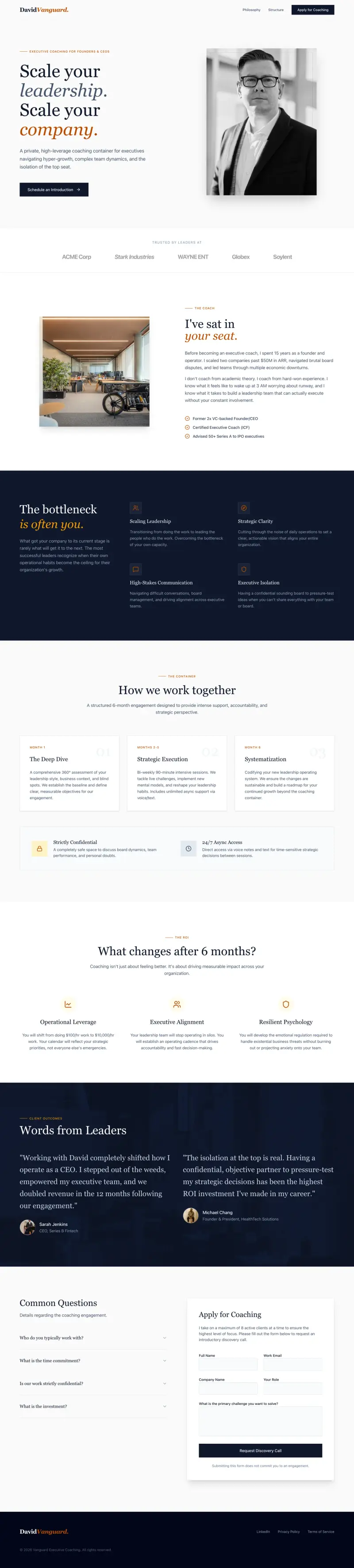
By the end of this guide, your coaching website will be live and doing the job it needs to do: building trust with potential clients and giving them a clear path to work with you. No technical background required.
A coaching website that generates clients does not need to be complicated. It needs to answer three questions fast: what do you do, who is it for, and why should someone trust you enough to pay for it? Get those three things right across five or six pages and the enquiries follow.
Why most coaching websites do not get clients
Most coaching websites have the same problem: they are written for the coach, not the prospective client. They lead with credentials and methodology, use vague language like "transformative journey" and "unlock your potential," and make it hard to understand what the coach actually helps with or how to work with them.
Clients looking for a coach are trying to solve a specific problem. The website that earns their trust is the one that names their situation clearly, explains how the coach helps, and makes it easy to take the next step.
- Name the problem your ideal client is facing, not your methodology
- Use plain language over coaching jargon
- Make your services, pricing, and process easy to find
- Show social proof (testimonials, outcomes) prominently
- Make the next step obvious: book a call, fill in a form, get in touch
Step 1: Build a homepage that earns trust in 10 seconds
Most visitors decide whether to stay within the first 10 seconds. Your homepage needs to answer three questions immediately: what you do, who you help, and what happens when they work with you. Put the most important message at the top, above the scroll, where everyone sees it.
Below that, give a short description of how you work (your process), a handful of testimonials, and a clear button to book a call or learn more about your services.
The opening statement
Your opening line should name the outcome your clients get, not your title. Compare: "Certified life coach helping professionals" versus "Stop feeling stuck at work and figure out what you actually want." The second one speaks to a problem. Lead with that.
Social proof above the fold
Even one or two short testimonials near the top of the page do more than a paragraph of credentials. If you have client outcomes you can share ("went from burned out to running her own business in 6 months"), even better.
A clear next step
One prominent button or link: book a discovery call, view services, or get in touch. Do not give visitors four options. One clear action wins.
Step 2: Write a services page that explains what you offer
Your services page is where potential clients decide whether you are the right fit. Be specific. Name what each program or service includes (number of sessions, format, length), who it is for, and what someone walks away with.
Vague descriptions like "one-on-one coaching" with no further detail leave clients guessing. Specific descriptions like "six weekly 60-minute video sessions, between-session messaging support, and a personalised action plan" give clients confidence.
- Name each program or service clearly (no jargon)
- Explain who it is for in plain terms
- Describe what is included (sessions, format, duration, extras)
- State what outcome the client is working toward
- Include pricing or at minimum a starting price (see pricing notes below)
- End with a call to action: book a discovery call or apply
Step 3: Use testimonials to do your selling for you
Testimonials are the highest-converting content on a coaching website. A real client describing a real outcome in their own words is more persuasive than anything you write about yourself.
Collect testimonials after each successful engagement. Ask clients to describe where they were before working with you, what shifted, and where they are now. That before-and-after structure is far more compelling than a general "she was amazing to work with."
- Ask for testimonials at the end of each program while the experience is fresh
- Request the before-and-after format: where you were, what changed, where you are now
- Place your strongest testimonials on the homepage, not just a separate testimonials page
- If you are just starting out, offer a discounted or free engagement to a few clients in exchange for detailed feedback
- Video testimonials are especially powerful if you can get them
Step 4: Write an about page that makes you human
People hire coaches, not credentials. Your about page should explain your story, why you do this work, and what makes you the right person for your ideal client. A professional photo is essential.
You do not need to be modest here. If you have relevant credentials, mention them briefly. But lead with your story and your perspective, not a list of certifications. End the page with a call to action to view your services or book a call.
- Include a good photo of yourself (warm and approachable, not a formal headshot)
- Tell your story: what led you to coaching, what you understand that others might not
- Mention relevant credentials briefly, but do not lead with them
- Describe who you love working with and why
- End with a link to your services page or booking page
Step 5: Make booking easy
Friction kills conversions. If a prospective client has to email you, wait for a reply, and then coordinate a time, some will give up before they start. The easier you make the booking process, the more enquiries you will get.
For coaches, a free 30-minute discovery call is the most common first step. Offer it prominently across your site, including on your homepage, services page, and about page. A simple scheduling tool (Calendly, TidyCal, or similar) removes all the back-and-forth.
- Offer a free discovery call as the main first step
- Use a scheduling tool so clients can book without emailing you first
- Embed the booking link or widget on your homepage, services page, and about page
- Keep the discovery call short and focused: 20-30 minutes
- Send an automatic confirmation email with details after booking
Step 6: Add a contact page and get found online
Not every visitor will be ready to book a call. A contact page gives them a lower-commitment option. Keep it simple: a short form with name, email, and a message field. Add your social media links if you are active on them.
To get found when people search for coaches in your area or niche, make sure your website mentions your specialty and location naturally. Each page title should include what you do and where you are based ("Business Coach for Women | London"). For a deeper guide to getting found on Google, see the resources below.
- Include a contact form as an alternative to booking a call
- Mention your location or the areas you serve (even online coaches have a home base)
- Use your specialty and location in your page titles and meta descriptions
- Create separate pages for each coaching specialty if you offer more than one
- Claim your Google Business Profile if you work with local clients
How Looops helps coaches build their site fast
Looops is an AI website builder you chat with. Describe your coaching practice, who you help, and the look you want, and it builds the full site for you, homepage, services, about page, testimonials section, and contact form. You then refine it by talking: "add a booking section to the homepage," "make the services page longer," "change the tone to feel warmer."
Contact and booking forms work out of the box and email you when someone reaches out. You can update your services, testimonials, and prices yourself without code. One-click publish puts the site live with hosting included.
- Chat to Build: describe your coaching practice, get a full site in minutes
- Forms: enquiry and contact forms that email you automatically
- Built-in database: update testimonials, services, and packages yourself
- Custom domains: use your own professional domain
- One-Click Publish: hosting and security handled
- Mobile-ready: looks great on the phone where most clients browse first
Build your coaching website today
Describe your practice and Looops builds the site. Free to start, clients from day one.
Free plan available, no card required
Frequently Asked
Questions.
Keep reading
Ready to build your website?
Describe what you want and Looops builds it. Free to start, no card required.
Start building free