A Website With an AI Assistant That Knows Your Business
By Sam Codes · · 7 min read
Every small business is hearing the same advice right now: put an AI assistant on your website, let it answer questions, capture the customers who visit at midnight. The advice is right. The usual way of following it is wrong.
The usual way is a chat widget: a third-party bubble pasted onto your site that knows nothing about your business until you spend a weekend feeding it documents. The better way is an assistant that is part of the website itself, built with it, aware of everything on it. Here is the difference, and how to get one.
Why bolted-on chat widgets disappoint
A chat widget is a separate product renting a corner of your screen. It comes with its own subscription, its own dashboard, and its own ignorance: it has never read your menu, your price list, or your opening hours. Out of the box, it answers like a polite stranger, because that is what it is.
You can improve it by uploading documents and writing FAQs into its admin panel, and then maintaining all of that forever, in a second place, every time your business changes. Most owners stop maintaining it within a month, and the widget quietly goes back to being a stranger.
What built-in actually means
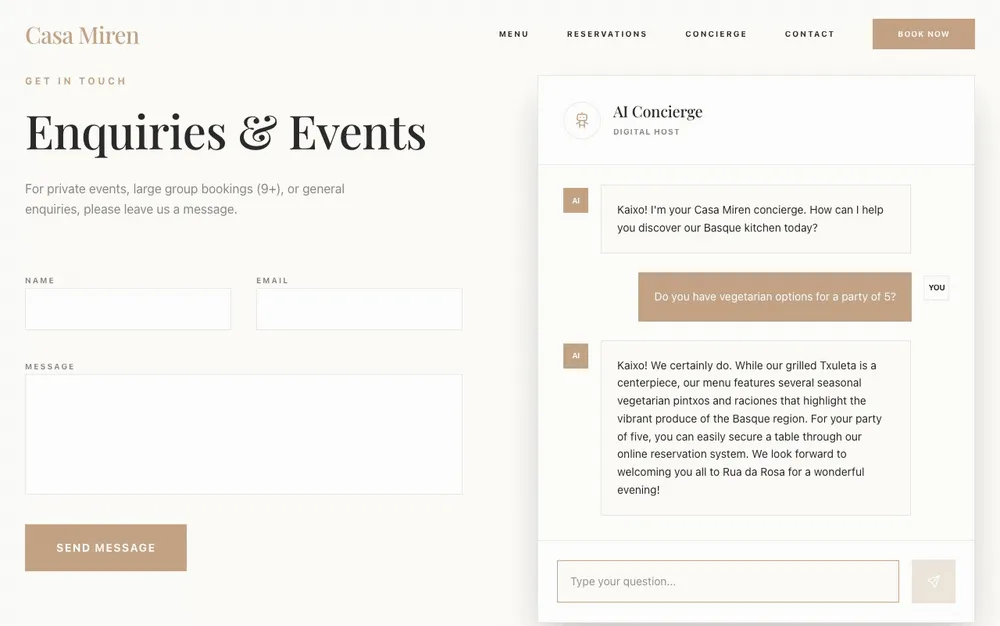
On Looops, the assistant is a feature of your website, not a visitor to it. You ask for it in chat while building, an assistant that answers questions about the menu, the services, the hours, and the builder wires it into the site. It draws its knowledge from the site's own content, and the platform keeps that knowledge in sync as your site changes.
No second dashboard. No document uploads. No separate subscription. When you update your services page, the assistant knows, because your services page is where its knowledge lives.
Watch one answer a real question
This restaurant site has a concierge built in. Ask it about vegetarian options for a party of five and it answers from the actual menu, mentions the seasonal small plates, and points at the reservation system, which is also part of the same site.
What it looks like for your kind of business
The pattern is the same everywhere: the assistant handles the questions that arrive when you cannot, and hands the visitor to the next step, a booking, a form, a call.
- A restaurant: menu questions, dietary options, hours, and a nudge into the reservation system.
- A clinic or salon: services, prices, availability questions, and a push to the booking page.
- A consultant or coach: what you offer, who it is for, and a route to the contact form.
- A shop: product questions, shipping and returns, what is in stock this week.
Already have a website? Read this before bolting on a widget
If your site lives elsewhere, the honest math is worth a minute. A capable chat widget costs a monthly subscription, plus the setup weekend, plus the forever-maintenance of its separate knowledge base. And at the end of it, you have a smarter stranger in a bubble.
Rebuilding on Looops takes an afternoon: describe your business, bring your content, and the site comes out with the assistant native to it, along with working contact forms and a real database if you need bookings. We also found that one in three small-business websites has a serious defect anyway (we studied 2,626 of them), so the rebuild often pays for itself in fixes you did not know you needed.
What it costs, in plain words
The assistant runs on our infrastructure and uses your existing Looops credits when it answers, so there is no separate AI subscription. The feature is included with the Personal and Pro plans, every plan's limits are public on the pricing page.
Build a site that answers for you
Describe your business, and get a website with an assistant that already knows it.
Free plan available, no card required
Frequently Asked
Questions.
Keep reading
Ready to build your website?
Describe what you want and Looops builds it. Free to start, no card required.
Start building free