Best Website Builders for Restaurants in 2026
By Sam Codes · · Updated · 10 min read
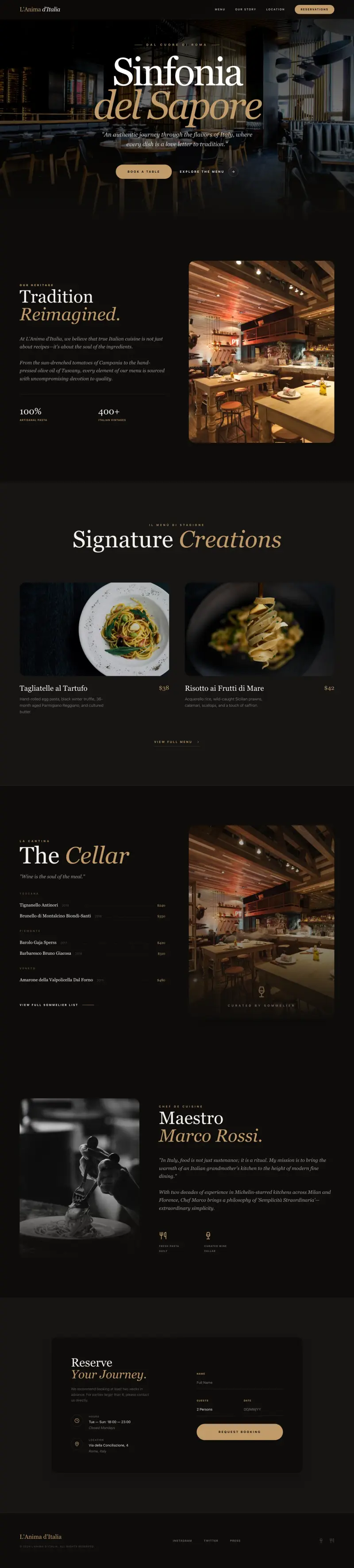
The best website builder for a restaurant gets you online fast, shows your menu beautifully, works perfectly on phones, and helps people find you on Google Maps and search. In 2026, you can choose between general AI builders that produce great-looking sites quickly, and restaurant-specific platforms with deeper booking and ordering tools.
This guide ranks the top options honestly, with real prices and a clear verdict on who each one is right for. Prices were verified September 2026.
What a restaurant website needs
Before picking a builder, here is what a restaurant site actually has to do:
- Show your menu: ideally a live, updatable menu, not a PDF or a photo of a printed sheet.
- Work on phones: most restaurant searches happen on mobile. A site that looks bad on a phone costs you covers.
- Help people find you: name, address, phone, hours, and a Google Maps link must be obvious and correct for local SEO.
- Take reservations or orders: even a simple form beats nothing; a proper booking widget is better.
- Load fast: slow restaurant sites are abandoned before the menu is seen.
- Be easy to update: menus change. You need to be able to update yours without calling a web developer.
Quick comparison: restaurant website builders
Prices are starting paid plans, billed annually, verified September 2026.
| Builder | Best for | Starting price | Built-in online ordering | Menu management |
|---|---|---|---|---|
| Looops | Custom-looking site fast, managed menu | ~$12/mo | Via forms/integrations | Built-in database/CMS |
| Squarespace | Beautiful visual presentation, simple menus | ~$19/mo | Yes (2% fee on Basic) | Page-based |
| Wix | Template depth, booking widget | ~$17/mo | App-based add-ons | App-based |
| BentoBox | Full-service restaurant platform | By quote (~$119/mo reported) | Yes (add-on) | Yes |
| Popmenu | Ordering + marketing automation | ~$159/mo | Yes (extra fee) | Yes (interactive) |
| GloriaFood | Budget online ordering add-on | Closed to new signups | Until April 2027 | Until April 2027 |
The best website builders for restaurants in 2026
1. Looops: best for a custom-looking restaurant site built fast
Looops is the fastest way for a restaurant owner to get a genuinely custom-looking website live without touching a designer or learning a builder. Describe your restaurant in plain English: your cuisine, your vibe, the pages you want. The AI builds the whole thing, home page, menu, about, contact, and you refine it by chatting or clicking any element.
The built-in database means your menu is real, editable content, not a static page. Update dishes, prices, or seasonal items yourself, no developer needed. The site is mobile-first and loads fast, critical for local search. A contact form is built in for reservation enquiries.
Where Looops is not the tool: if you need full commission-free online ordering with a POS integration out of the box, the restaurant-specific platforms below go deeper. Looops is the right choice when the priority is a great-looking, professional presence that is easy to own and update.
- Best for: restaurants, cafes, and food businesses that want a custom-looking, mobile-friendly site fast and a menu they can update themselves.
- Pro: AI builds a custom-looking site from your description in minutes.
- Pro: built-in database for live, editable menus, no static PDFs.
- Pro: mobile-first, SEO-structured, and fast from the start.
- Pro: built-in forms for reservation enquiries; custom domain on paid plans.
- Pro: free to start, yours to keep.
- Con: no built-in online ordering system (connect a third-party ordering tool).
- Con: newer platform; fewer pre-built restaurant templates than Squarespace or Wix.
- Price: free to start; paid from about $12/mo.
2. Squarespace: best for a visually beautiful restaurant site
Squarespace has some of the most beautiful restaurant templates available, and its Blueprint AI helps you get a polished starting point quickly. It handles hosting, a custom domain, and a basic online store on paid plans.
For a restaurant, Squarespace works well for showcasing atmosphere and food photography. Menu pages are typically built as standard content pages, not dynamic database entries, so updating a menu means editing page content rather than a structured list. Every paid plan can sell, but the Basic plan takes a 2% transaction fee on orders; the Core plan ($29/mo) removes it.
- Best for: restaurants with strong food photography and a focus on visual brand presentation.
- Pro: genuinely beautiful templates; Blueprint AI gives a strong design starting point.
- Pro: solid hosting, domain management, and a good all-in-one experience.
- Con: menus are content pages, not a structured database; updates require editing each page.
- Con: no free plan; 14-day trial only.
- Con: 2% transaction fee on the Basic plan (Core at $29/mo removes it); no site download.
- Price: from about $19/mo (billed annually); selling included, fee-free from the $29/mo Core plan.
3. Wix: best for template variety and built-in booking
Wix has dedicated restaurant templates and a Wix Restaurants app that adds an online menu and basic ordering. Its Wix Bookings app handles reservation requests. For a restaurant that wants to stay on a familiar, well-supported platform, Wix covers the basics.
The trade-offs: online ordering and reservations are app-based add-ons, not built-in, so costs add up. You cannot download or own your site. The ADI AI tool gives you a starting point, but you end up editing by hand in the standard drag-and-drop editor.
- Best for: restaurants that want a well-known platform with app-based ordering and booking add-ons.
- Pro: wide template library including dedicated restaurant designs.
- Pro: Wix Restaurants and Wix Bookings apps handle ordering and reservations.
- Pro: free plan available (with Wix branding and subdomain).
- Con: restaurant features are app add-ons, not built-in; total cost can climb.
- Con: no site download or portability.
- Price: free plan; paid from about $17/mo (Light plan); restaurant apps may add cost.
4. BentoBox (now Clover Hospitality): best full-service restaurant platform
BentoBox is built exclusively for restaurants, not adapted from a general website builder. It handles your website, online ordering, reservations, gift cards, and event ticketing in one platform, with dedicated restaurant onboarding and support. Since 2025 it is sold as Clover Hospitality by BentoBox, alongside the Clover point of sale.
The trade-off is price and process: pricing is by quote, and third-party reports put the website alone around $119/mo, with takeout and delivery ordering from about $49/mo plus a $0.99 per-order fee. That is justified for a full-service or multi-location restaurant that wants a professional, restaurant-specific solution. For a single-location cafe or small restaurant, it is often more than you need.
- Best for: full-service restaurants, fine dining, and multi-location groups that need a serious, all-in-one restaurant platform.
- Pro: built for restaurants from the ground up, with ordering, reservations, events, and gift cards.
- Pro: dedicated restaurant templates and onboarding support.
- Con: quote-based pricing, reported from about $119/mo for the website alone, a large investment for small operators.
- Con: overkill for a cafe, food truck, or single-location casual restaurant.
- Price: by quote; reported from about $119/mo for the website, ordering from about $49/mo plus $0.99 per order.
5. Popmenu: best for marketing-focused restaurants
Popmenu builds on the restaurant website with interactive menus (every dish is a shareable page, which helps local SEO), commission-free online ordering, and automated marketing tools that use your menu data to generate social posts and email campaigns.
It is a compelling package if your restaurant wants to actively market online. The cost reflects this: starting at $159/mo prepaid annually ($179/mo month to month), with online ordering as an add-on around $50/mo plus a $1 per-order customer fee.
- Best for: restaurants focused on growing their online presence with marketing automation alongside a professional website.
- Pro: interactive menus where every dish is a separate indexed page (strong local SEO).
- Pro: automated marketing tools powered by your menu.
- Pro: commission-free ordering (fee per order rather than percentage).
- Con: $159/mo starting price is steep for smaller operators.
- Con: online ordering costs extra; the full solution adds up quickly.
- Price: from about $159/mo prepaid annually; ordering from an additional $50/mo plus $1/order.
6. GloriaFood: closing in April 2027, not for new sites
GloriaFood was the budget way to bolt online ordering onto a restaurant site: a free, commission-free ordering system with a $9/mo website add-on. Oracle, which owns it, has closed new signups and announced that the platform retires on April 30, 2027.
If you already run GloriaFood, plan the move now: the shutdown notices say menus, customer lists and order history go offline on that date with no read-only access. If you are choosing today, pick one of the tools above.
- Best for: existing GloriaFood restaurants planning their migration; not for new sites.
- Pro: existing accounts keep working until April 30, 2027.
- Con: closed to new signups; Oracle has announced no replacement.
- Con: the website tool is basic; design quality is limited.
- Con: no data export or read-only access after the shutdown date, per the shutdown notices.
- Price: no longer sold; existing plans unchanged until the shutdown.
How to choose the right restaurant website builder
The right tool depends on where you are and what you need most:
- Need a great-looking site fast, with a menu you can update yourself? Looops is the fastest path.
- Want the most beautiful visual templates and an all-in-one experience? Squarespace.
- Want a familiar platform with booking and ordering apps? Wix.
- Running a full-service restaurant and willing to invest in a dedicated platform? BentoBox or Popmenu.
- Already have a site and just need affordable online ordering? GloriaFood.
Get your restaurant online today
Describe your restaurant and Looops builds a custom, mobile-friendly site. Free to start.
Free plan available, no card required
Frequently Asked
Questions.
Keep reading
Ready to build your website?
Describe what you want and Looops builds it. Free to start, no card required.
Start building free