Your Site Is Live. Now Let People Find It.
By Sam Codes · · 7 min read
Publishing a website is half the job. The other half is people finding it: showing up when someone nearby searches for what you do, being quoted when someone asks ChatGPT, and knowing whether any of it is working.
Until now, Looops took care of the first half and left the second one to you. Starting today it does both. Every site gets checked after every publish, the problems come with a one-click fix, and Google Analytics and Google Search Console are set up for you in one click. Here is all of it.
A new Growth tab
Everything about getting found lives in one place: the new Growth tab at the top of the builder. It has two views. Visitors shows who comes to your site. SEO shows how Google and AI assistants see it, and what to improve.
Both read your published site, the one your customers actually visit, not the draft in the builder.
An SEO check after every publish
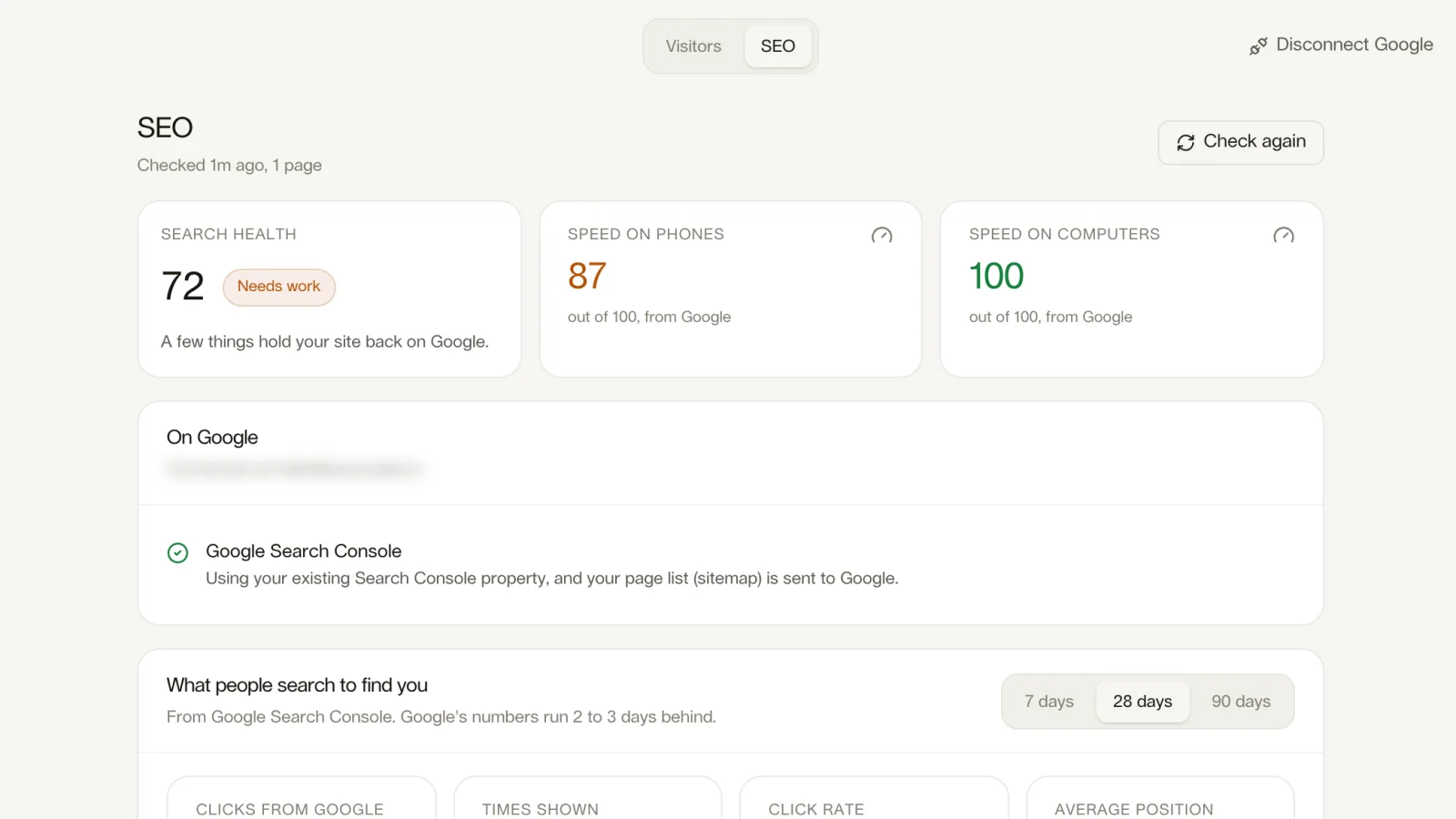
About a minute after you publish, Looops reads your live site the way Google does and gives it a score out of 100 and a grade: Healthy, Needs work or Weak. Then it lists every problem, most important first, grouped by area: titles and descriptions, share previews, business details for search engines, headings and images, the rules search engines follow, AI assistants.
Each problem comes with a Fix with Looops button. Press it and the AI fixes that one thing in your site, usually for about one credit. Or press Fix all. Publish again and the next check shows what is gone, under Fixed since the last check.
- A score and a grade for your live site, after every publish
- Every problem in plain words, with the pages it affects
- One-click fixes, or all at once
- Speed on phones and computers, measured by Google
- An All good list, so you see everything that was checked
The basics, done on every site
Some SEO work should never land on your to-do list, so it does not. When you publish, Looops adds to every site, on every plan: a sitemap listing your pages, a robots.txt file that lets Google and AI assistants in, an llms.txt file, a short guide to the site for AI assistants, each page's main address so Google does not see duplicates, a share preview image for links on WhatsApp and LinkedIn, and a title for any page that forgot one. Private pages like login and admin stay out of Google.
We checked this on 36 real sites built on Looops before switching it on. Share previews were missing on 22 of them; after the publish step, on none. Page addresses were missing or wrong on 34; after, on none. That is the kind of problem most owners never notice, and never should have to.
Google Analytics, set up in one click
Google Analytics is the most complete way to understand your visitors: where they come from, which pages they read, who comes back, what they click. It is also famously fiddly to set up. On Looops you press Connect Google once and sign in. That is the whole setup.
If you already use Google Analytics, Looops uses it. If not, Looops creates it for your site in your own Google account and adds it to every page. No code to paste, no measurement ID to copy. Your numbers then show right in Growth → Visitors: visitors, new and returning, a live view of who is on your site now, a countries map, top pages, where visitors came from and more.
What people search on Google to find you
The same connection sets up Google Search Console, Google's own tool for search. Looops verifies your site with Google, submits your page list, and shows the results in the On Google section of the SEO view: what people typed to find you, how often you appeared, how often they clicked, and your average position.
It also points at the easy wins. Pages that show up in Google often but rarely get clicked usually have a weak title or description, and one button asks the AI to rewrite them.
Ask the AI how your site is doing
Once Google is connected, you can simply ask in the builder chat: "how is my site doing this month?", "why did my visits from Google drop?", "is my menu page on Google?". The Looops AI reads your real numbers and answers in plain words. It never guesses traffic.
What is on which plan
The automatic basics are on every site, on every plan. The full SEO check with fixes and speed scores, Google Analytics and Search Console are part of the Personal and Pro plans. On the free plan, the check still runs after every publish and shows your grade and how many problems each area has. See the pricing page for what each plan includes.
What no tool can do
Honesty matters here. No website builder can make Google list a page faster or move you up the results; Google does not allow it. What we can do is make sure nothing on your site holds you back, show you exactly what people search for, and make the next improvement one click away. The rest is what it has always been: useful pages, a Google Business Profile, and reviews from happy customers. Our guide to getting your website on Google covers those.
Build a website people can find
Checked after every publish, fixed in one click, with Google Analytics set up for you.
Free plan available, no card required
Frequently Asked
Questions.
Keep reading
Ready to build your website?
Describe what you want and Looops builds it. Free to start, no card required.
Start building free